






| |||||
|---|---|---|---|---|---|
|
|
|
|
|
|
|
RSA Authentication Manager, its Agents and Network Address Translation |
Scope |
This technote has been written to bring together a couple of issue regarding the use of RSA Authentication Manager in an environment requiring Network Address Translation.
|
SolutionIn the following technote we will look at a couple basic examples, the first being a situation where the RSA Authentication Agent IP Address is statically translated (to hide its real address), and the second example where the RSA Authentication Manager IP Address is statically translated (For example to make it publicly accessible to remote Agents) 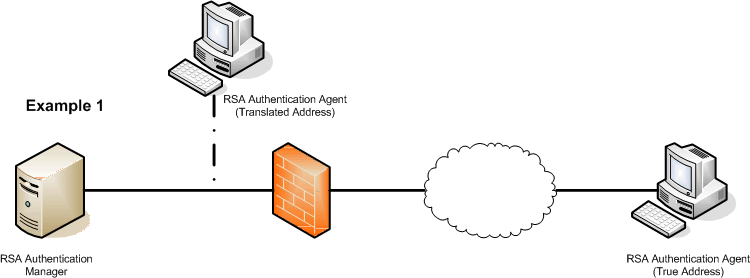 The network diagram above represents the overall configuration described by the first part of this technote. The problem here is that the RSA Agent will sign the data it sends to the Authentication Server using its real address. Although the firewall is able to translate the IP addresses correctly, it is not able to correct the digital signature, so when the Authentication Manager receives the packet and decodes it, the decision is made to discard the request, sending Access Denied to the Agent and logging "ACCESS DENIED, passcode incorrect" on the Activity Log. This problem can be resolved using the Secondary Node option and treating this Agent Host as a multihoned item. The primary address for the Agent Host needs to be its real address and this should be resolvable (ideally in the local Hosts file). The Secondary Node will be the internal translated address, again resolvable (and ideally in the local Hosts file). 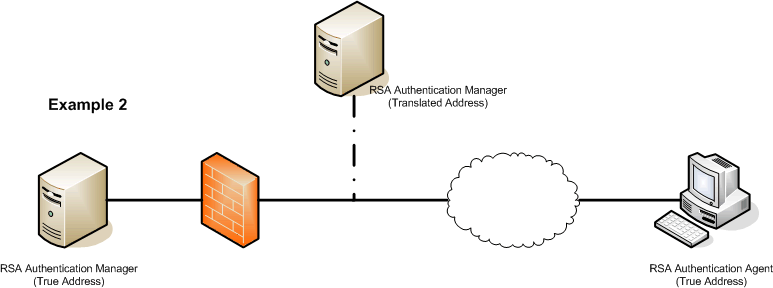 The diagram above covers the second example, where an RSA Authenication Manager has to be address translated to make it accessible to its remote Authentication Agents The corner stone of the RSA Authentication Server is a file called sdconf.rec. This file holds all of the key information about an Authentication Manager Server, such as its IP address, the address of its Replica Servers, the encryption scheme used, etc, etc. Usually there is only one copy of this file located in the /ace/data directory. It is however possible to create multiple versions of this file. The problem that you will encounter when trying to address translate the Authentication Manager is that the Agent will only ever try to contact the server defined in the sdconf.rec. Before you can translate the Manager, you first need to create a copy of the sdconf.rec that contains the valid translated address. This is achieved via the Agent Host editing tool, in the Database Administrator. First select the agent host you wish to edit, then hit the "Assign Acting Servers" button. This will then give you the option to either assign new acting servers from a list or manually. Assigning the servers from a list will restrict you to assigning the internally know addresses, assigning manually will allow you to add any IP address. As a result of this action the Database Administrator will as for the location that the new sdconf.rec should be stored in. Make sure that is it not sorted anywhere that it might be confused with the standard file. This all becomes much more important and apparent when you consider a multi firewall environment utilising replica servers. Our final example shows one such configuration. 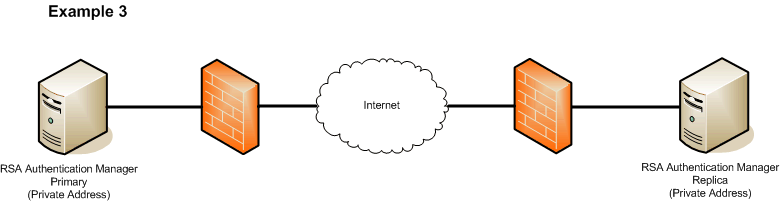 In this configuration for each firewall to authenticate connections successfully to both the Primary and Replica server, it will need to be authenticating to a local address for the local manager and a translated remote address for the remote manager. In this case each firewall would require a uniquely defined sdconf.rec as described above.
|
| services | products | about us | contact us | in the news |